MathAudio Latency Meter VST/AU
- Measures Round-Trip Latency (RTL) of sound cards and audio interfaces.
- Uses a correlation-based measurement method that is unaffected by DAC and ADC transients.
- Provides measurement accuracy of 0.01 ms.
- Measures RTL in the range from 0 to 1300 ms.
- Supports full range of sample rates from 44.1 kHz up to 384 kHz. All sample rates are supported without resampling to avoid any possible loss in accuracy.
- Supports automatic scaling for 4k monitors. Supports manual window resizing (drag the bottom right corner of the window).
- Supports VST, VST3, CLAP on Windows and AU, VST, VST3, CLAP on Mac.
Latency Meter Help
Round-trip latency (RTL) is one of the most important parameters of audio interfaces that are used in recording studios.
Low-latency audio interfaces allow singers and musicians to hear plugin-processed audio in real time through headphones. Such monitoring dramatically improves recording quality because singers and musicians receive real-time feedback in the form of the processed audio while they are singing or playing their musical instruments.
The main challenge with this recording method is the audio interface's signal latency. Singers and musicians hear a combination of sounds arriving from three sources: through the air, through bone conduction, and through their headphones. If the sound from the third source is significantly delayed relative to the sound from the first two sources, it no longer masks them. As a result, the feedback mechanism is disrupted, ultimately leading to a degradation in recording quality.
Many older PCI audio interfaces, now discontinued, were capable of achieving latencies of around 2..3 ms — low enough for direct monitoring applications. Unfortunately, finding a modern audio interface with comparably low latency has become much more difficult. Instead of tackling the technically challenging problem of reducing round-trip latency (RTL), many manufacturers have taken the easier approach by adding a "Direct Monitor" switch or button. This allows the microphone signal to be monitored with no latency, but without any processing. However, this method is not a complete substitute for monitoring the processed signal, because it breaks the feedback loop: the singer or musician is no longer hearing the same sound that will ultimately be recorded.
The challenge of choosing a low-latency audio interface is further complicated by the fact that manufacturers do not always publish round-trip latency (RTL) specifications, or they publish them only for the lowest buffer settings and highest sample rates.
MathAudio Latency Meter makes it possible to measure the round-trip latency (RTL) of audio interfaces under a variety of operating conditions, as well as to compare different audio interfaces based on this parameter. The Latency Meter also indicates the latency status according to the following classification:
| MathAudio RTL Classification | |
|---|---|
| RTL < 2 ms | Ultra-Low Latency |
| 2 ms ≤ RTL < 3 ms | Very Low Latency |
| 3 ms ≤ RTL < 4 ms | Low Latency |
| RTL ≥ 4 ms | Elevated Latency |
The following table contains RTL measurement results for a few well-known low-latency sound cards:
| Name of the card | RTL | Measurement conditions |
| M-Audio Audiophile 2496 | 2.04 ms | 96 kHz, 64 samples, PCI-to-PCIe adapter |
| ESI Juli@ | 3.03 ms | 96 kHz, 32 samples, PCI-to-PCIe adapter |
| RME HDSP 9632 | 3.45 ms | 96 kHz, 64 samples, PCI-to-PCIe adapter |
The process of measuring round-trip latency (RTL) with the MathAudio Latency Meter is as follows:
1. Install Latency Meter
Follow the installation instructions inside the ZIP file.
2. Connect the audio cable
Connect "Line In" of your sound card to its "Line Out" by means of the audio cable.
3. Set sample rate and buffer size
Set the desired sample rate and buffer size in "Preferences" of your DAW or in "Control panel" of your sound card.
4. Start Latency Meter plug-in
Create a new empty stereo project in your DAW. Then include the Latency Meter plug-in to that project. Make sure that no other plug-ins are included into the chain. Adjust the direct monitoring in your DAW. Open the plug-in window in accordance with the manual of your DAW.
5. Measure the latency
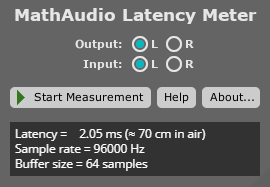
Click the "Start Measurement" button. The latency of your audio interface will be displayed in milliseconds as it is shown below.